Open Source · Apache 2.0

A Personal AI Agent
& MCP Server on Your Machine

A self-hosted agent harness on your own machine — say what you need in one sentence, and it builds the tool, tests it, and reuses it.
Every tool is sandboxed and shared with Claude Code, Codex, and any MCP agent.

curl -fsSL https://agenvoy.com/scripts/install.sh | bash
agen
What's the weather in Taipei?
 
⏵ Search Tools(weather)
⏵ Plug Tool(Script fetch_weather)
 
⏺ Currently 28°C in Taipei, partly cloudy with 72% humidity.
  Wind from the northeast at 12 km/h.
 
  ⏜ 3.2s · claude-sonnet-4-6 · ↑2.1K · ↓340
 
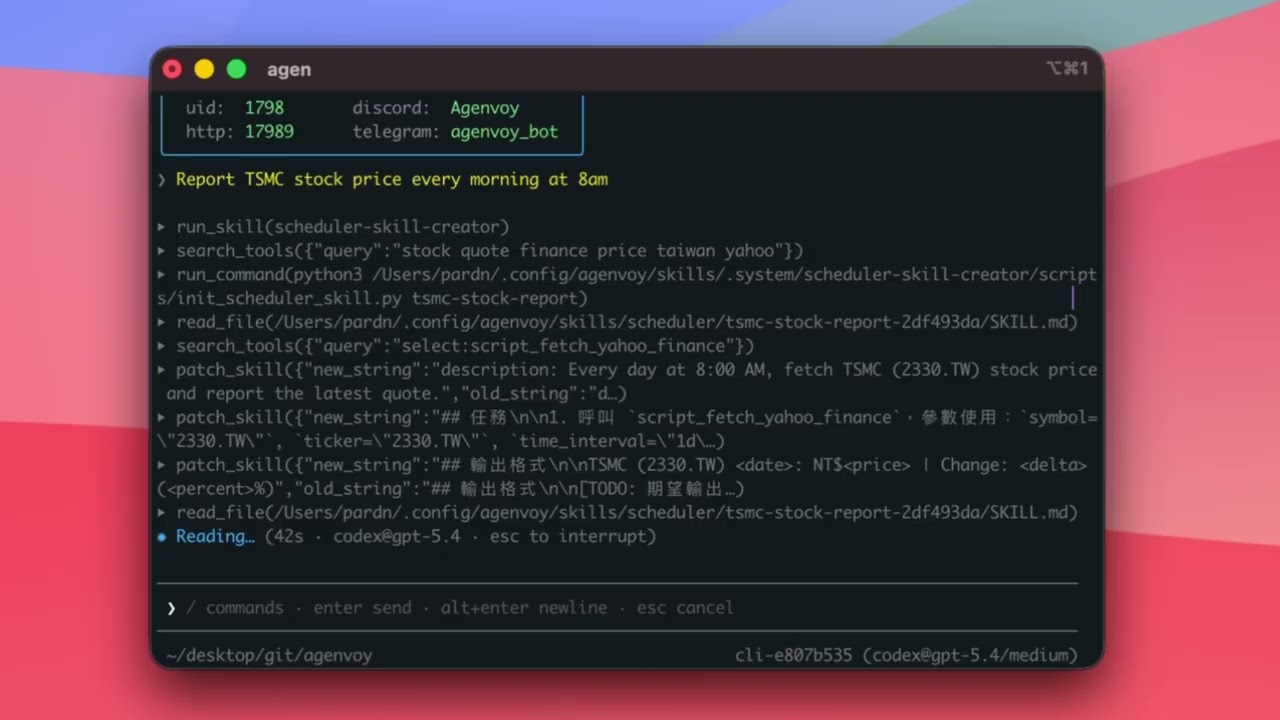
Report TSMC stock price every morning at 8am on Telegram
 
⏵ Plug Tool(Script fetch_yahoo_finance)
⏵ Add Schedule(0 8 * * *)
 
⏺ Done. Scheduled daily at 08:00 — results push to Telegram.
  ⏜ 5.8s · claude-sonnet-4-6 · ↑3.4K · ↓520
Web Dashboard

Drive Your Agent From the Browser

Manage sessions, tools, schedules, and memory from a browser. Open web.agenvoy.com once the daemon is running on your machine — it connects to your local agent, nothing leaves your device.

Features

Everything You Need in One Binary

Auto-built tools and a built-in MCP server at the core — plus multi-model routing, scheduling, and memory, all in a single Go binary.

Auto Tool Generation

Ask for anything. If no tool exists, the agent builds one — writes the script, tests it in a sandbox, and registers it. Next time, it's already there.

MCP Server & Client

Server mode shares every sandboxed tool with Claude Code, Codex, and any MCP client — which can auto-build new tools too. Client mode calls external MCP services.

Multi-Model Dispatch

10 LLM providers behind one interface. The dispatcher routes each task to the best model automatically.

Scheduler

Cron jobs and one-shot tasks with skill binding. Daemon fires them, hot-reloads on change, auto-disables on failure.

3-Tier Memory

Context window, semantic vector search, full-text SQLite archive. Cross-session error memory with 90-day TTL.

Sandboxed Execution

Every command and script runs inside an OS-native sandbox — bubblewrap on Linux, sandbox-exec on macOS.

Skill System

Loadable markdown instruction packs with YAML frontmatter. Slash-command activation, natural language trigger, or cron-bound.

Self-Improvement

When a skill fails, the agent rewrites it, git-commits the fix, and retries. Rollback available via git_rollback tool.

RAG Integration

Optional KuraDB child process for external document search. Keyword + semantic dual-track over your personal knowledge base.

How It Works

Capability Gap → Auto-Build

When no tool fits a request, the agent builds one in real-time — finds an API, writes the script, tests it, and saves it for reuse. No code required.

Step 1

Detect Gap

User asks for live data. No matching tool found.

Step 2

Find API

Search public APIs, fetch docs, pick the best match.

Step 3

Write & Test

Generate script + schema. Run test_tool to verify.

Step 4

Call & Share

Execute the new tool. Auto-persisted for all agents.

MCP

Share Tools Across All Your Agents

One config line gives Claude Code, Codex, and any MCP agent your entire sandboxed tool library — and they can auto-build new tools that everyone instantly shares.

Server

Expose Your Tools

Any MCP-compatible agent connects via stdio and gets access to all tools — built-in, script, API, and extension.

// claude_desktop_config.json
{
  "mcpServers": {
    "agenvoy": {
      "command": "agen"
    }
  }
}
Claude Code Codex OpenCode Cursor
Client

Call External Services

Connect third-party MCP servers via stdio or HTTP/SSE. Tools auto-registered and available to the agent immediately.

// ~/.config/agenvoy/mcp.json
{
  "github": {
    "command": "npx",
    "args": ["@modelcontextprotocol/server-github"]
  }
}
stdio HTTP/SSE Hot Reload
Integrations

Talk to Your Agent Anywhere

Same agent, same tools, same memory — accessible from terminal, chat apps, HTTP, or other AI agents.

TUI

Interactive terminal with slash commands and session switching

Telegram

OTP-authenticated bot with HTML output and voice

Discord

Guild-verified bot with markdown and button confirms

REST API

OpenAI-compatible chat completions endpoint

MCP Server

Expose tools to Claude Code, Codex, and more

Providers

10 LLM Providers, One Interface

Unified Agent.Send() interface. Dispatcher auto-routes tasks to the best model.

Anthropic
Claude 4.x
OpenAI
GPT · o-series
Codex
ChatGPT OAuth
Gemini
2.x · 3.x
Copilot
GitHub OAuth
Nvidia
NIM API
xAI Grok
Grok 4 · 3
DeepSeek
Chat · Reasoner
OpenRouter
200+ models
Compat
Ollama · vLLM
Tools

60+ Built-in Tools, Infinitely Extensible

From file ops to web search, from RAG queries to image generation. Missing a tool? The agent builds it.

File & Search

Read, write, patch, list, glob, and search local files with policy guards.

read_filewrite_filepatch_file list_filesglob_filessearch_files

Web & HTTP

Fetch pages with readability, search the web, browse news, HTTP requests.

fetch_pagesearch_websearch_google_news send_http_requestdownload_file

Orchestration

Spawn subagents, delegate to external CLIs, run cross-reviews, plan.

invoke_subagentinvoke_external_agent generate_planrun_commandrun_skill

Memory & RAG

Search history, persist error resolutions, query external docs via KuraDB.

search_chat_historyremember_error search_error_historylist_ragsearch_rag

Media & Interactive

Transcribe audio/video, generate images, interactive prompts, secrets.

transcribe_mediagenerate_image ask_userstore_secretcalculate

Extensibility

Auto-generate tools from natural language. Drop scripts, API descriptors, or connect MCP.

script_*api_*ext_* mcp__*write_tooltest_tool
Get Started

Up and Running in 60 Seconds

One command to install, one command to start. Add a provider and you're ready.

1

Install

Single binary. macOS and Linux.

curl -fsSL https://agenvoy.com/scripts/install.sh | bash
2

Add Provider

Connect any of 10 LLM providers.

agen model add
3

Create Session

Name it. Persists across restarts.

agen session new my-agent
4

Launch

TUI opens. Daemon auto-starts.

agen

Start Building with Agenvoy

One binary. One install. Infinite tools.

中文